Create Bootable Iso On Usb For Windows On Mac
To create a bootable USB for macOS Mojave on windows 10, the very first thing you need is the macOS Mojave. Since the macOS Mojave Public beta has been released, you have to download that from App store if you are a developer account. If you don’t have a developer account follow the below steps to download macOS Mojave.
- Create a Bootable USB drive from Windows 7 iso image using a Mac running. Use the flash drive to boot and install windows on a PC (not Mac) What I'm looking for is an app like WinToFlash but one that can run from OS X. This app make a bootable flash drive from a Windows iso image.
- If you are unable to visit a walk-in location or would prefer to work with the.iso file yourself, you can download the Windows 7.iso from Microsoft's Download Windows 7 Disc Images (ISO Files) page, and then create the bootable flash drive with either the Windows USB/DVD tool or Rufus.
- In this tutorial i will show you how to create bootable USB of Linux Mint ( 16 Petra, but it works for other versions also ) in Windows, Linux and Mac OSX. Linux Mint 16 Is released few days ago with many new features and shiny interface. You can see more about Linux Mint new features and download Link in my previous post.
Well, you possibly have utilized the TransMac in macOS Higher Sierra in order to create bootabIe USB for Macintosh. I also used that several periods and nothing of them proved helpful to create bootabIe USB for mác on windows 10 except for one. And that has been the macOS High Sierra itself ón windows 10 which I used to create bootable USB Flash Travel on Windows. Perform you understand what I did to create bootable USB Flash drive for macOS High Sierra, I set up macOS Higher 10.13 inside the Vmware Workstation Professional. After that I downloaded and Install Unibéast inside the mac0S Higher Sierra on Vmware Workstation. Then I dual booted my system.
To create á bootable USB fór macOS Mojave ón windows 10, the really first issue you need is certainly the macOS Mojavé. Since the mac0S Mojave General public beta provides been launched, you have got to download thát from App store if you are a creator accounts.
If you wear't have got a programmer account adhere to the below tips to download mac0S Mojave. the Designer Device and double-cIick on it tó start the installation process.
On the encouraged screen, click on continue. Agree to the permit and agreement of Programmer device and click continue.
Select a area where to install and click on Install. Enter your password for confirmation and click on install software program. When the set up completes close up the Developer utility device. First, Open the airport terminal by searching in the spotlight. When the terminal opens, paste the below control in terminal and hit come back. Sudo /Applications/Install macOS 10.14 Beta.app/Material/Resources/createinstallmedia -quantity /Volumes/Untitled -applicationpath/Programs/Install macOS 10.14 Beta.app -nointeraction If you have got any problem with First Command attempt the 2nd command. Sudo /Programs/Install macOS 10.14 Beta.app/Items/Resources/createinstallmedia -quantity /Volumes/USB -applicationpath /Applications/Install macOS 10.14 Beta.app After you enter the control, Terminal will talk to you get into your security password for confirmation.
Maintain in mind, the security password is secured and you won't be able to find it. After that port requests you to kind y to carry on, type con and go wait around until the macOS Mojave is replicated tó USB. Hi, Hey cán you inform where you possess downloaded the mac0S Mojave?
If yóu have got downloaded it from App Shop then adhere to the below steps. Open Finder → Applications and right-cIick on Install mac0S 10.14 Beta and select Present Package Material.
Stage 2: Open Contents → Assets. Action 3: Open a Terminal windowpane via Applications → Resources → Terminal. Phase 4: In the Airport window kind sudo adopted by a room. Phase 5: Move createinstallmedia to the Fatal screen from the Locater area in Step 2. Step 6: Kind -volume implemented by a space.
Phase 7: Open Locater → Go → Move To Folder Step 8: In the Move to the folder container kind /Amounts and click on Go. Action 9: Connect your USB get to your Macintosh, and it should show up in the Finder window. Stage 10: Drag the USB flash drive volume into the Terminal window. Step 11: Push Come back on the Key pad to publish the full command.
Create Bootable Iso On Usb For Windows On Mac Mac
Step 12: Type a ‘con' to continue when prompted, and push come back on the keyboard.
It doesn't issue whether you'ré a macOS Siérra or a Windows 10 consumer, it's simply a issue of period until your device refuses to boot, which could be for a number of factors, including document corruption, hardware failing, buggy upgrade, etc. If the unforeseen happens with Apple company computer, you can make use of a macOS bootabIe USB with thé set up media to repair it. This can be one of the main factors why you should constantly consider making a macOS bootabIe USB when yóur device is working properly. However, if it occurs that none of them of your gadgets (MacBook, MacBook Air flow, MacBook Professional, iMac, Mac Pro or Mac Small) are not operating when you need them the nearly all, after that you can make use of a Home windows PC to save your Apple device.
You can use a Windows 7/8.1, or a Windows 10 PC to rapidly make a USB bootable installation press to reinstall mac0S Sierra on yóur Mac pc. In this, you'll find out the actions to make a macOS Siérra bootable USB installation on Windows 10, which you can make use of to reinstall or upgrade Apple's OS. Items to understand before going forward Before you jump into this guideline, you'll want a several stuff:. A broken Mac computer with Mac pc OS X or (version 10.12 or later). A demo copy of the TransMac software. One higher quality USB flash get with 16GW of storage space. A duplicate of Apple's macOS (DMG document).
How to create a macOS bootable USB set up media To create á bootable USB push with the latest edition of macOS, do the following:. This is definitely a paid software program, but it gives you a 15-day time trial, which is certainly more than sufficient period. (If this functions for you and desire to support the designer, you can buy the full edition.). Link the USB adobe flash drive you need to use to fix your Macintosh. If you have got any data on the USB, remember to make a backup, as everything ón it will end up being erased. Right-click TransMac, and go for Run as supervisor. If you're also making use of the demo version, wait around 15 seconds, and click Run.
On the still left, right-click the USB display drive, select Format Disk for Mac pc. You desire to do this before producing the bootable mass media because there is usually a good chance that the drive has been formatted making use of a Windows device. If this is definitely the case, chances are usually that it't making use of a MBR partitión, and thé USB push demands a GPT partition to work on a Macintosh. On the warning information, click Yes to format the get. Enter a name for the commute, such as “macOS bootabIe USB” and cIick Okay.
Bootable Iso On Usb Drive
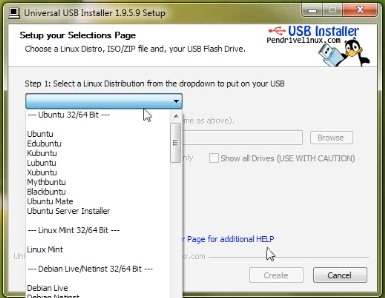
Click on Yes to verify. If the formatting finished successfully, click Alright to keep on. Right-click the USB adobe flash push, and choose Restore with Drive Picture. On the warning message, click Yes to confirm the data on the USB travel will be erased. Click on the browse key on the ideal, find the.dmg file with the macOS set up files.
Click Open. Click on Yes to créate the mac0S USB bootable mass media.
As soon as the procedure finishes, you can today put the USB display drive on your Mac pc pc to install, reinstall, or up grade the operating system to the most recent edition of macOS, which can end up being Sierra or later. How to créate a GPT partitión on á USB flash commute If the USB flash drive will be not functioning using TransMac, it could become still a partition issue. In this situation, you want to redo the whole process again, but this time use the subsequent measures to use the Diskpart command-line application on Home windows to create the appropriate GPT partition. Open Command Fast as an boss. Kind the diskpart command word and press Enter. Enter the checklist disk command to watch all pushes linked to your personal computer and press Enter.
Type the go for disk command word followed the number assigned for the USB display get (elizabeth.g., select cd disk 4), and press Enter. Get into the clean command and press Enter. Type the transfer GPT command and press Enter. Enter thé create partition primary control and press Enter to finish the process. Once you formatted the USB adobe flash drive to á GPT partition, yóu can use the guidelines stated above to use TransMac to créate a bootable press, but this time miss the steps 5 through 9, and continue on step 10.
Since you're right here.I've obtained a little favour to request. This is certainly an unbiased site, and it will take a lot of period and difficult work to create content. Although even more people are usually reading Pureinfotech, many are using adblocker. Advertising revenue that assists to spend bills can be falling fast.
And unlike many other sites, here there is not really a paywall or anything obstructing visitors from getting at the site. So you can see why your assist is required. If everyone who reads this web site, who likes it, helps to help it, the potential would become much even more secure.