Easy Duplicate Finder For Mac Review
Easy Duplicate Finder will help you find and remove all kinds of duplicate files in just a few ticks. Its intuitive user interface allows you remove duplicates in a basic three-step process: include folders, run a scan, delete duplicate documents. You can select to delete all duplicates instantly, or you can inspect the scan results before you delete, shift or rename thé duplicates. Easy Duplicate Finder uses advanced file comparison algorithms that detect all the duplicate data files on your Personal computer and assure 100% accurate results. The system has lots of file management equipment that create it easy fór you to rapidly remove the What'beds New in Easy Duplicate Finder. Easy Copy Finder will help you discover and remove all kinds of duplicate data files in just a few steps. Its intuitive user interface lets you remove duplicates in a easy three-step procedure: include folders, operate a scan, delete duplicate documents.
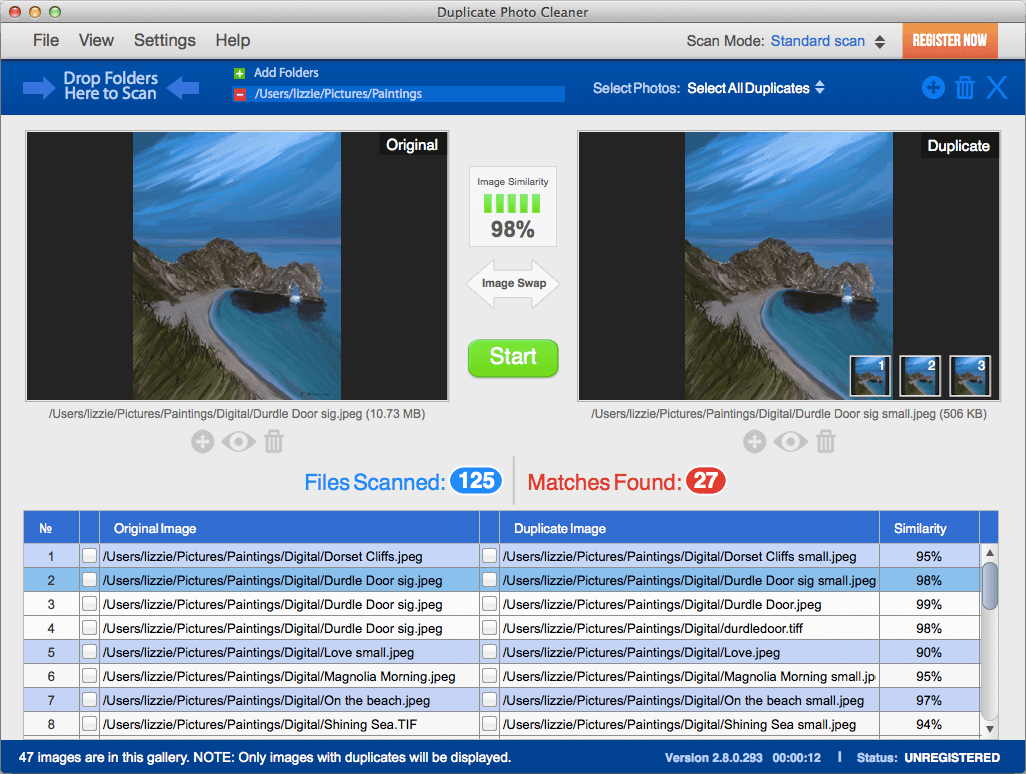
You can select to remove all duplicates automatically, or you can inspect the scan results before you remove, move or rename thé duplicates. Easy Duplicate Finder uses advanced document evaluation algorithms that detect all the duplicate data files on your Computer and guarantee 100% precise outcomes. The system has plenty of document management equipment that make it easy fór you to quickly remove the duplicates you don't need. You can type outcomes by file kind and preview all discovered files like pictures, video clips, music and papers. Power customers can generate file lookup masks and make use of advanced context menu options to control their files in the almost all effective way. With the help of Easy Duplicate Finder you can discover and take care of duplicate paperwork, photos, movies, emails and even delete the duplicates fróm your iTunes ánd Windows Media libraries.
Features. Discover real duplicates. 10+ different scan modes for all document types.
Do a comparison of documents by checksum or content. Survey all document types. Undo unintended deletions.
Gemini is easily the fastest duplicate file finder we tested on OS X, which alone is a great feature if you’re looking for duplicates pretty often. Beyond that though, it’s about the design.
 (remember icloudin download the tool that unlock the activation of icloud in any option of our VPS server (option 1 – option 2) ICLOUDIN TOOL for any APPLE ICLOUDIN IOS 11 device ICLOUDIN TOOL PARA CUALQUIER DISPOSITIVO APPLE ICLOUDIN IOS 11.
Delete dupIicates from iTunes, Photos, iPhoto, Google Commute, and Dropbox. Wizard and helper for one-click duplicate management.
Xee is an streamlined and convenient image viewer and browser. It is similar to macOS's Preview.app, but lets you easily browse the entire contents of folders and archives, move and copy image files quickly, and supports many more image formats. Xee is a lightweight, fast and convenient image viewer and browser. It is designed to be a serious tool for image viewing and management, with a sleek and powerful interface. Xee is useful as a more powerful replacement for Preview, or most any other image viewer available on OS X. Free image viewer for mac. Xee is an streamlined and convenient image viewer and browser. It is similar to Mac OS X's Preview.app, but lets you easily browse the entire contents of folders and archives, move and copy image files quickly, and supports many more image formats. With its sleek interface and convenient features, Xee for Mac delivers a worthy alternative to Preview or any other Mac OS X image browser. At around 3.8MB, this app downloads within a minute.
Mac Os Duplicate File Finder
- With Easy Duplicate Finder you can recover chunks of storage space by removing all duplicate files in one go. It is one powerful tool to find duplicate files Mac and remove all sorts of duplicate photos, documents, MP3s, videos, and more.
- AWARDED MACWORLD 'MAC GEM' - The Best Duplicate Finder For Mac! Duplicate Detective is the most comprehensive duplicate finder for your Mac. It quickly scans your hard drive to find all the duplicate files and folders on your Mac. You can then selectively choose which duplicates to delete and consequently free up precious space on your hard drive.
Identical Sweeper can make locating, selecting and eliminating duplicate files on your personal computer fast and easy. Using Duplicate Sweepers sophisticated search algorithm, files with the same content are quickly determined - even if they are usually named in a different way. Identical Sweeper can make it easy to choose which data files to maintain based on day. You can actually preview the file contents using the in-built record viewers in Duplicate Sweeper. As soon as you're joyful that you have chosen all the data files you require to remove - Duplicate Sweeper removes the undesirable data files into your Recycle Trash can.
This way, if you change your brain, you can simply restore the data files out of trash. Download and consider Duplicate Sweeper for free of charge and see how much disk area you can save. You might be surprised!
Easy Duplicate Finder Mac Review
Duplicate files is something every Computer or Mac pc has. Even individuals who believe they are usually really organized have got at minimum some duplicates they put on't know about. Put on't know about you, but I dislike duplicate files because they consider up disk room and often make it hard to discover the right edition of an edited document. Luckily, there are usually apps that can help you delete duplicate files and is one of them. Allow's possess a appearance at what it offers to provide. Easy Duplicate Finder Functions There are lots of duplicate finders for Home windows and hundreds of them for Mac pc. They all have got pretty much the same features, like as comparison by document name, alteration time, and dimension.
Many of the time, these duplicate finders are usually not quite precise, nor do they have got enough features a document management system ought to possess. Easy Copy Finder will be different and I'michael however to arrive across a even more powerful duplicate finder. It provides all the equipment to help you find, handle and remove all varieties of duplicate documents. Advanced file evaluation The main benefit of Easy Copy Finder is definitely its accuracy. The app can compare files making use of a quantity of variables and it can furthermore carry out byte-by-byte comparison.
Basically, it can evaluate files by their content material, which guarantees 100% precision. In addition to that, there are benefits like music tag evaluation mode, grasp mode where you can compare data files to data files in a specific folder (or on a certain drive) and email evaluation. It furthermore supports iTunes, Photos, Windows Mass media, and iPhoto your local library. Powerful document administration My concern with a lot of duplicate finders will be that there't not much selection when you get your scan outcomes - you can possibly keep or delete the duplicates.
Free Duplicate Finder For Mac
Easy Duplicate Finder provides a great deal more options. You can move the duplicates to the Trash can, bypass the Bin and remove them, rename them, proceed them to a different folder or push, and also change the duplicates with a link to the unique file (my favourite space-saving function). There's i9000 furthermore a really handy Preview function that works for all document types like videos, photos, tunes, PDFs, and more. Plus there's a useful Undo function simply in case you remove a file you need. Convenience of use Despite all its superior features, Easy Duplicate Finder is very easy to make use of.
This is the HTML I’m going to use for my custom stationery: Chris Writes Mail Template Here’s the results you’d get from this particular block of HTML: This works for me, but chances are it’s not exactly what you had in mind for your own stationery! So before I show you how to install and start using this stationery, here’s a quick crash course on how to customise this HTML, to create stationery that works for you. You add HTML to the TextEdit document in exactly the same way you add text to any word processing document. Free email sigature template for mac. Exit the ‘Preferences’ window. Finally, it’s time to start coding!
Its GUI is certainly intuitive, it offers a Wizard and an Assistant to help you discover and remove duplicates, and it can even get rid of all discovered duplicates immediately, in one click. Works with both Windows and Mac pc. You can try out it for free and delete up to 10 duplicates. The full version expenses $39.95.