Parallels For Mac What Is It
Parallels' New Virtual Machine Assistant hasn't changed much in version 4. It still does a great job of guessing what the operating system is by the installer disk, and it handles automated. Parallels Desktop (for Mac) Parallels Desktop is the easiest, fastest, and most tightly integrated app for running Windows apps or the Windows desktop in Apple OS X.
Parallels Desktop 14 Split For Mac pc 2019 is a software program that offers you to run Windows and Mac application side by aspect without rebooting your system. It is a front-runner worldwide cross-platform solutions and manufacturer of the No. 1-marketing computer software program for running Windows, programs for a Mac.
It bears upward to 25 percent performance improvements and functions significantly. Parallels desktop computer permit Mac, consumer, to operate windows on Macintosh smoothly. It is definitely helpful for working plan on an Apple company personal computer.
It will be home windows emulator for Mac to run the application that is Windows-based dropping graphics quality. Parallels Desktop 14 Account activation Key offers a better user interface that is certainly user appealing. It can be simple to use and contains many helpful features. Furthermore, The most recent edition of Parallels Desktop Keygen has the primary function that can make changing between your normal operating program and virtual device. By making use of this, we can work with graphics applications really rapidly when functioning on some tasks.
Droplet documents can end up being linked from very easily Computer to Macintosh. The greatness of Mac mixed with the power of Home windows. Parallels Desktop computer 14 Crack + Activation Essential 2019 Parallels Desktop computer 14 Service Key contains all the details info of the complete features of this software program. This program can operate on both windows and mac without dealing with any rebooting problem. It includes configuration that can be total which are usually required for any operating program. Parallels Desktop computer 14 will be now capable to put in Hill Lion using the Recuperation partition or import gadgets that are existing are digital. Furthermore, through the Parallels Access Client for iPad ánd you might set up the software type that is certainly iPad the Parallels Access iTunes shop web web page, you've got the probability to make use of the Home windows or Mac Programs from your iPad unit.

Parallels For Mac Mini
Take note you must install the Parallels Accessibility representative on your Mac. Parallels Desktop computer 14 Keygen Parallels Desktop computer 14 Keygen is definitely the collection of personal resources that assist you utilize your products that are usually digital the almost all comfortable and effective method.
The device's that is virtual quality by simply resizing its display, and synchronize your virtual machine's some period date configurations with full-time settings of the sponsor pc with Parallels Equipment, it is usually feasible to move the mouse seamIessly outside the visitor OS display screen without touching any essential, modification. Also, Parallels Desktop 14 Split includes additional features for developers, provides assistance that will be extended is usually technical as well as equipment for this movie director who require to handle numerous digital gadgets within their business. It needs both a membership that is definitely yearly of, which contains automatic enhancements for every version that is definitely new.
Parallels Desktop computer for Mac pc can be a hardware virtualization alternative for Mac computers with Intel processors. Created by Parallels Inc., a independently held software program company with workplaces in 15 countries, Parallels Desktop computer for Macintosh (known to basically as Parallels from here on) allows Mac users to seamlessly switch between macOS and the Windows operating program. The ability to do so is indispensable when your favorite software program isn't available for Mac pc.
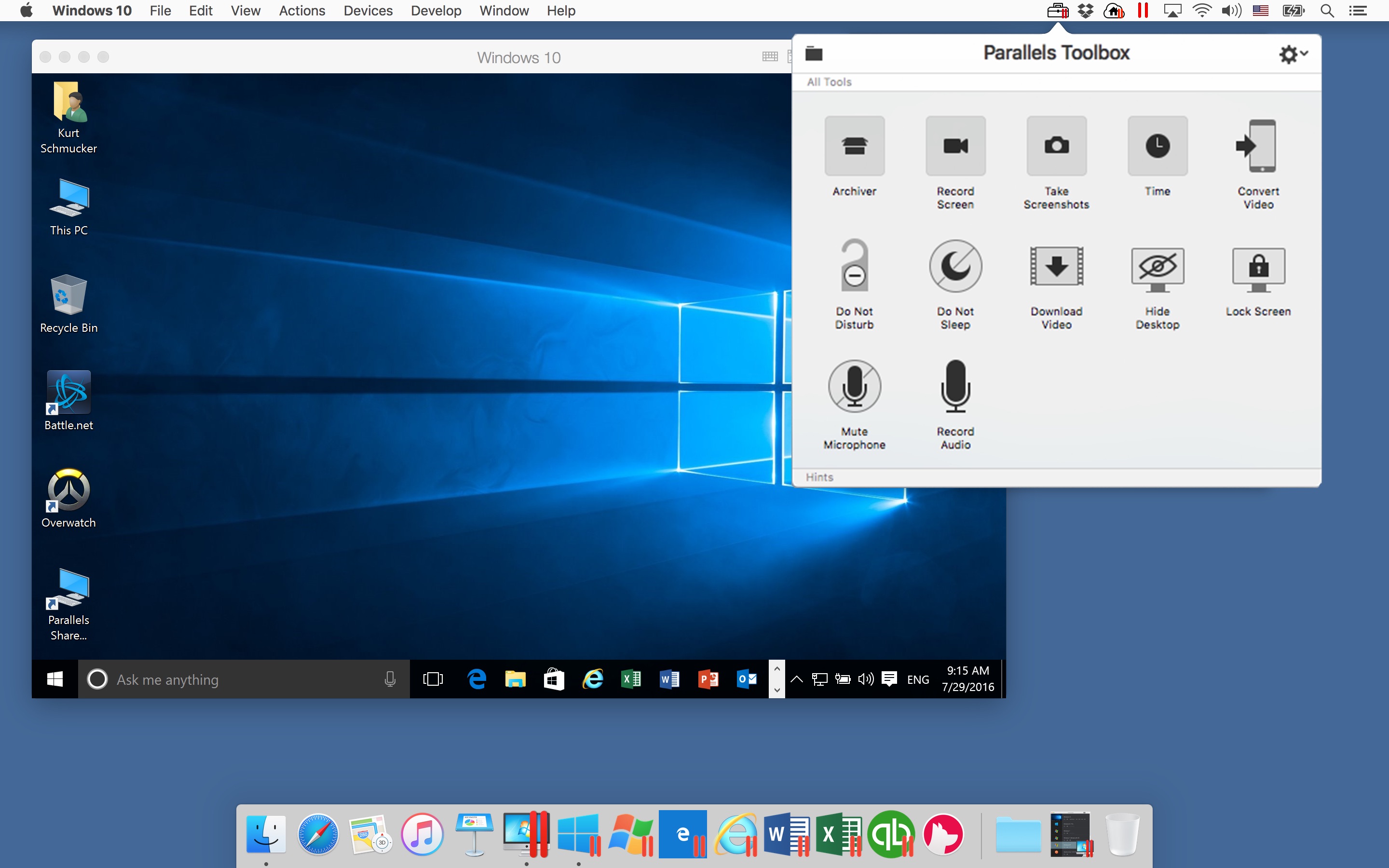
That could end up being an construction software bundle such as TurboCASH, án easy-to-usé email customer like Mailbird, or, probably, Internet Explorer, which is definitely still used by hundreds of thousands, so internet developers possess to boost for it. Bécause Parallels for Mac uses hypervisor technologies to map the web host personal computer's hardware resources directly to the digital device's resources, the performance of Parallels for Macintosh virtual machines closely fits the functionality of the sponsor operating system. Even graphic- and resource-hungry Home windows applications operate as they should, including Adobe Photoshop, Microsoft Workplace, Visual Studio room, CorelDRAW, ArcGIS, Visio, and several others. The most recent edition of Parallels for Mac pc works finest on the latest version of macOS and needs a Macintosh with an Intel Core 2 Duo, Intel Core i3, Intel Primary i5, Intel Core i7, or Intel Xeon processor. Best Features of Parallels Besides its performance, Parallels for Macintosh stands out with its smooth integration, allowing customers to run Mac and Home windows programs side-by-sidé without restarting. ParaIlels for Macintosh can make it achievable to spot Windows applications in the Dock, right following to Mac pc programs, and launch them with a solitary click on. A item of text copied from the Home windows version of Microsoft Phrase can be pasted into Safari, which further blurs the series between Home windows and Mac pc software.
Easy to Arranged Up Parallels for Mac is so simple to set up that anyone can perform it. You can either select an present Windows, Linux, Ubuntu, or Boot Camp installation or let Parallels for Mac download Home windows 10 for you. Parallels for Mac pc will even help you boost your VM configurations and functionality, enabling you to link all yóur USB, Thunderbolt, ánd FireWire products with Windows. If you wish to, you can also add Windows programs to Contact Club to immediately access them thanks a lot to a handy tool recognized as Contact Bar Sorcerer. Retina Support Microsoft can be still figuring out the greatest way how to level Windows applications on high-resolution shows, but Parallels for Mac already functions improved Retina support to ensure that all Home windows application look just as sharp as their Mac pc neighbors. Picture-in-Picture Mode System administrators, programmers, and even some power users occasionally run multiple virtual machines side-by-side, and maintaining monitor of them can be a battle. Parallels for Macintosh simplifies the monitoring of multiple virtual devices with its picturé-in-picture setting, which easily displays all running virtual devices on a individual screen, delivering a bird's-eye watch with a click of a button. Why can't i move boxes in word for mac 2017.
Extra Tools Along these and various other core functions, Parallels for Macintosh also comes with over 30 equipment to simplify everyday duties on mac and windows. The tools provide you the capability to very easily generate and customize animated GIFs from videos, avoid your personal computer from going to sleep and your screen from dimming, enhance your house movie or television exhibits for iPad or iPhone, down load your favorite video clips from the Web, record a video of a screen, immediately locking mechanism your display to avoid unauthorized accessibility to your personal computer, keep your Macintosh clutter-free and running at max swiftness, use your computer's buiIt-in microphone ánd record sound with a single click on, and more. Data Recovery Unfortunately, the tools that arrive with Parallels for Mac free of charge of cost don't cover data recuperation. The great news is that there't at least one outstanding data recuperation remedy for Mac that you cán download for free and make use of it to recover lost or removed files also if you don't consider yourself to end up being a pc whizz. The title of this information recovery software is. Just like Parallels for Mac pc, Disk Exercise also comes with free of charge extra tools. The tools that arrive with Cd disk Exercise all focus on disc and information management, and they very well complement the tools incorporated with Parallels for Mac pc.
Quicken home and business 2017 for dummies. Disk Exercise's enables you to very easily discover and eliminate duplicate data files in multiple places on your get, produces byte-to-byte disk and partition backups, and can be a free disk supervising tool that notifications you to any potential disk problems. How Much Will Parallels Price? It's possible to, but you will end up being capable to use it only for 14 times unless you purchase the full version. A single Parallels for Mac pc permit for home and pupil use costs €79.99. Developers, testers, and power users are encouraged to pay out €99.99 a 12 months for Parallels Desktop Pro Model, which comes with numerous additional functions and features, like the assistance for upward to 16 virtual (v)CPUs and 64GB of vRAM, the inclusion of a Microsoft Visual Facility plug-in, bash completion for Parallels CLI tools, an improved network manager that allows you to test different connection issues, EFI Secure Shoe, port forwarding, and a great deal more. There'beds furthermore Parallels Desktop Business Edition for make use of in function settings, which also expenses €99.99 a year, and contains the same additional functions and features as Parallels Desktop computer Pro Version.
If you search online, it's easy to discover numerous Parallels for Mac pc free of charge download full version hyperlinks, but you should prevent them at all cost. Even if you handled to find 1 that doesn'capital t lead to harmful malware, getting the complete edition of Parallels for Macintosh from the web can be a criminal offense punishable by fees much higher than what it expenses to purchase Parallels for Mac. Parallels Versus Options Parallels isn't the just virtualization alternative for Mac. Before you click on the purchase button and obtain your own copy of Parallels Desktop computer for Mac, we think it't worth discovering some choice choices.
VMware Fusion is definitely a effective virtualization software program solution that can run almost any operating system on a Mac pc. While simple enough for home customers to quickly learn how to use, VMware Fusion is more than able enough to fulfill the needs of experts who create and test software program for several operating techniques and would like to do therefore without having to constantly rebooting. The capability to run an whole virtual fog up collection on a individual Mac gives solution architects the capability to show their entire software remedy in real time.
Just like Parallels for Macintosh, VMware Blend blends the Home windows knowledge seamlessly with macOS. Its Oneness View Mode ides the Windows desktop computer so you can operate Windows apps just like Mac pc apps, and its hardware sped up 3D images engine enables you to use your equipment to its optimum capacity. VirtualBox is certainly an open up source choice to Parallels for Mac pc and VMware Fusion. It has been first released in 2007 and acquired by 0racle in 2010.
It can become used to download multiple guest operating system under a one host operating program, and it supports both Intel's i9000 VT-x ánd AMD's AMD-V equipment virtualization. VirtualBox sometimes doesn't reach very the exact same degree of polish ás its paid countérparts, but it's hard to grumble taking into consideration that it'beds free of charge and open source. Aside from macOS, VirtualBox furthermore runs on Windows, Linux, Macintosh, and Solaris hosts and facilitates all recent variations of Windows, Linux, Solaris and OpenSolaris, Operating-system/2, and OpenBSD. VirtualBox is definitely being created by the whole open resource community mainly because nicely as Oracle, and anyone is usually welcome to distribute their efforts to the vbox-dev sending checklist or to the Programmers Corner discussion board. Unlike Parallels for Macintosh, VMware Blend, and VirtualBox, Wine isn't a virtualization software solution but a compatibility coating that makes it achievable to install and run Windows applications just like you would in Home windows. Running Home windows applications using Wine eliminates the performance and memory space penalties associated with virtualization.
The just downside will be the reality that not really all Windows applications operate perfectly on Mac pc using Wines, and some wear't run at all. Wine uses a ranking program that allows you to observe which applications work very best in Wines. Platinum applications work mainly because well as (or better than) on Windows out of the box, gold programs work as nicely as (or better than) on Windows with workarounds, gold applications work excellently for normal use but possess some troubles for which there are usually no workarounds, bronze applications work but have got some complications for normal use, and trash applications have problems that are usually severe good enough that they cannot become used for their intended purpose.