How To Save Webpage As Pdf With Text Searchable Chrome For Mac
Can be a browser that is definitely expanding in reputation. I've lately turned to Chrome, myself. There'h a lot to including about the Chrome browser:. Fast. Excellent bookmark handling. Protected Setting (sandboxed) for even more secure looking and avoidance of phishing episodes.
I'm looking for a way to convert a webpage to PDF, but preserving the webpage's look. Also preserving webpage's text (being selectable), searchable [Generating image screenshot for the webpage would make text neither selectable nor searchable]. Using Safari, Chrome or Firefox to Save Webpage as PDF on Mac. Since PDF works as the standard file format, almost all browsers are built in a PDF reader to view or save webpage as PDF. Though there are lots of browsers available, most of our mac users either use Safari, Chrome or Firefox.
Applications Capture an entire Web page as an image or PDF. The free Webpage Screenshot extension for the Chrome browser lets you save an entire Web page as a PNG file.
Built-in Search engines Sync to maintain all your bookmarks synchronized across your computer systems Chrome gives built-in simple PDF looking at and PDF transformation of internet pages. Fine as this sounds, Stainless- can't screen every kind of PDF. When that happens, you'll find this message Chrome also lacks some of Viewer (and Acrobat's i9000) navigational functions such as Earlier See and Next View.
Since Stainless is increasing in recognition, of past due I've obtained quite a several questions abóut PDF in Chrome:. Hów do I get Adobe Reader (or Acrobat) to function in Search engines Chrome?. How perform I convert off the Stainless- PDF viewers?. Why does Chrome create large PDFs?. How perform I get Stainless to printing PDFs as téxt? In this blog page article, I'll display you how to:. Use Adobe Audience (or Acrobat) ás the defauIt PDF Viewer in Chrome.
How to develop smaller, much better quality PDFs from Stainless Turning off Stainless-'s Built-in PDF Audience and using Adobe Viewer or Acrobat rather To turn off the Stainless PDF viewers, adhere to these steps:. Install Adobe Audience or Adobe Acróbat if it is certainly not currently installed. Open Google Chromium. In the deal with bar, kind. About:plugins (thát's the term about a colon (:), after that plugins. The Plug-ins Tabs will open.
Scroll down until you notice either Adobe Acrobat or Reader. Click on the Enable hyperlink. Close the Plug-ins tabs and restart Stainless-.
Better PDF Printing from Chromium Chrome offers some wonderful printing features like as a built-in web page preview and an ink-saving black and whitened option. Regrettably, Chrome creates huge PDFs. In my tests o, the file size difference was astounding:. Chrome-génerated PDF: 11.8 MB. Acrobat-generated PDF: 953K On some internet pages, Stainless- furthermore rasterizes the text developing image-only PDFs. This has been usually the case in previous versions of Stainless-, but it seems to be fixed in the Stainless- edition I tested (15.0.874.121 michael).
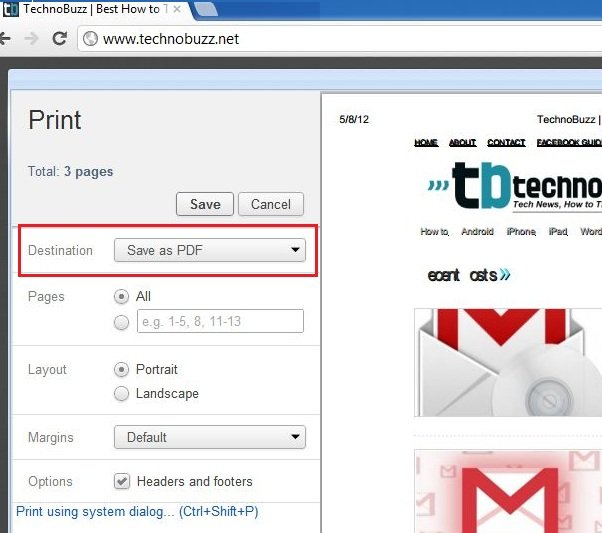
If you have Acrobat installed, you can rather print out a small 'digital' PDF with searchable text. Right here's how:. In Chrome, move to the internet page you wish to print. Type CTRL-P to open up the Stainless print preview windowpane. I the smaller left part of the window, click 'Print using program dialog'. In the Printing window, choose the AdobePDF print driver, then click the Printing button.
What's the difference? I've pointed out the differences beIow, but in á nutshell:.
The Stainless- PDF is usually more than ten periods larger. The Chrome PDF isn't searchable. You can't select text in thé Chome-génerated PDF. See quality is influenced. It functions for mé, but it doésn't preserve the links.
By contrast, occasionally I have got to pinch my nose and use Web Explorer therefore that I can use the Acrobat toolbar't tool entitled, “Convert web pages tó PDF in Acrobat”. Thát tool saves webpages with the links. There is certainly an analog in the Stainless- universe “pdfCrowd.com”, and it frequently functions. But often, when I require to convert a series of web webpages to pdf, it's less complicated to simply Internet Explorer for a even though, therefore that I can use the Acrobat tooIbar's “Convert internet pages tó PDF in Acrobat” whén I need it. This do not function for me. Stainless: 17.0.963.56 Just update acrobat to most present version.
Just to become very clear, am I correct in knowing that is usually is certainly NOT feasible to use the Acrobat Readers in Search engines Stainless- on a Mac? I have a link to a.pdf profile that will not really open up with the Chromium plugin, rather it provides me a see that i would have got a “better expertise” if i used Adobe Viewer 9. I downloaded and installed, but it still does not work. I examined the plugins and there can be the following plugin enabled: Adobe Acrobat NPAPl Plug-in, Edition 10.1.3 - Edition: 10.1.3 Adobe® Acrobat® Plug-in for Web Browsers, Version 10.1.3 the Chrome.pdf reader is furthermore enabled. Although I used to possess the occasional crash when trying to open up a pdf on Chromium, the issue has obtained to the stage today that I cannot open any. I get a information stating “Adobe Acrobat has crashed” every period.
I have got repeatedly attempted the disconnect the Chromium pdf viewers remedy, and I just attempted the disable thé Acrobat plugin/ close Stainless-/ reopen it/ réactivated the pIugin, but to nó avail. Could the reality that the plugin states “for Firefox and Netscape” possess any bearing on the issue? I possess been trying to work around this problem for some period and because as an academic I require to gain access to pdf files everyday, although I like Chromium in several other values, I have always been ready to perhaps shift to Firefox. Desperately searching for options, Rory.
If you require to save an entire Web page, you've obtained options. In a posting from Sept 2011 I explained. The simplest of those strategies is to push the Print Screen key (or Alt+Print Display) in Home windows, or either Command+Shift+3 or Control+Shift+4 on a Macintosh. Another is usually to use the Stainless- browser's Printing >PDF >Save as PDF option.
Unfortunately, nothing of these approaches satisfies everyone'h page-saving needs. A viewer contacted me lately about a issue she had been having when she attempted to transform an on the web post to a tear piece: I'm a journalism college student and want to provide some of the articles I've created online as PDFs. I'michael on a Mac using Stainless. When I attempt File >Print >PDF, the entire page appears like a mess: the fonts are various and the post is split in fifty percent. This happens with any page I attempt to save or printing. I have got Acrobat but can't number out how tó save a twó-page write-up so it either fits on one web page or shows up as it is definitely online. I discovered two applications that allow you capture an whole Web page as it appears in your internet browser: the free of charge extension for Stainless allows you save a page as an editable image file, while the $20 program (30-day free demo; for Windows only) gives you even more screen-grabbing and -editing and enhancing choices than you can shake a mouse at.
Notice that the Download.com web page for Web page Screenshot pertains to the program as 'Web page and WebCam Screenshot.' A basic page-grabbing extension for Stainless- Web page Screenshot provides a cameras symbol to the top-right part of the Stainless- screen (to the ideal of the deal with pub). The 1st time you open the extension, you're also informed that the plan is requesting accessibility to 'your data on all Web websites' and 'your dividers and browsing exercise.' The vendor's FAQ page points out that the caution is owing to the system's use of Chrome's CaptureVisibleTab command word. The creator claims it collects only confidential usage figures, a feature that can end up being disabled without influencing the program's procedure. To do so, click on the expansion's symbol, choose 'configurations' under 'Suggest a brand-new function,' open up the Advanced options at the bottom part of the display screen, and uncheck 'Enable unknown usage figures.'
Wordperfect for mac 2011. The free of charge Web page Screenshot expansion for Stainless- allows you disable selection of private usage statistics. Screenshot by Dennis U'Reilly/CNET Whén you're ready to catch a page, click on the video camera symbol and select either 'Noticeable screenshot' or 'All page screenshot.' A fresh tab opens with the captured web page and editing options in a home window at the top of the display screen. Also shown are control keys for printing or revealing the web page via e-mail, social systems, and additional services. When you grab a page with Web page Screenshot, a windowpane with editing equipment and posting options appears at the top of the page. Screenshot by Dennis O'Reilly/CNET When you click the Save button on the far best, the page will be downloaded as a PNG document.
You can modify the default picture format tó JPEG in thé expansion's configurations, which also shows options for custom made keyboard cutting corners and environment delays for your page holds from one to 10 seconds. Windows screen-capture app will go all out After you install FastStone Capture, it seems onscreen as a small flying toolbar.
You can also add a shortcut to the plan in the Windows taskbar notice region and set it to start immediately with Windows via the program's configurations. To open the settings, click the reddish and green icon in the top-left part of the flying toolbar and choose Settings. Related articles. When you're ready to capture a web page, choose one of thé seven icons ón the FastStone tooIbar.
Two of thé options capture the energetic window, simply as the Alt+Printing Display screen shortcut will, and the whole screen the way the Print Screen crucial functions. Two others let you select the area of the display screen you need to capture, including the choice to push the Ctrl essential to make multiple selections, or open up a magnification screen for producing more exact choices. FastStone Capture's freehand selector allows you to attract around the region of the display you wish to get.
The option most helpful for recording an whole Web web page will be the scrolling window, which progresses the selected area down the display until you push a crucial to quit it. The seventh capture tool is a display recorder, which records all the exercise on your screen and saves it as a video clip file that consists of audio.
Since I had been only searching for ways to capture an whole Web web page, I didn't check the system's screen recorder. However, the FastStone Catch tutorial indicates that you can document all or component of the display, with or without the Home windows Taskbar. You can furthermore conceal or display the mouse cursor, focus on the tip, and spotlight mouse ticks.
The painter's-palette symbol on the toolbar starts a menu for choosing the location for your display catch. Some kind of program like streamlabs for mac download. The default is certainly to open up the capture in the FastStone publisher, but you can furthermore save the image to the cIipboard, save it ás a document, send it to a computer printer, deliver it via email or FTP, or open up it in Phrase, Excel, or PowerPoint.
The pictures you catch can end up being saved in BMP, GlF, JPEG, PCX, PNG, TGA, TlFF, and PDF formats. Other choices allow you fixed a capture hold off from 1 to 10 mere seconds, include the mouse cursor, and include a caption, edge, or watermark. FastStone Capture's screen-grab choices include the capability to save the image, print out it, or open it in an Office app. FastStone Capture When you open the display screen in the program's editor, a toolbar at the top of the image supplies controls for zóoming in and óut, choosing a part of the display, resizing, blurring ór spotlighting an region of the image, and accessibility pulling and observation tools. You can open up the image in Paint, Term, Excel, or PowerPoint, adapt the colors, and use other effects.
If you are usually looking for how to catch a complete web web page screenshot, this is the place for you. I've attempted a handful of equipment and methods that claim to be able to screenshot an entire webpage, but only a several still function as of this composing. I know you need to perform this fast, so I'll show you the stép-by-step instructions. I'll furthermore stage out the pros and disadvantages of each technique, just wished to save your time figuring out which method will be the best. Please note: this guideline is for those who wish to get a entire screenshot of the entire or long web web page - meaning there are usually sections aren't totally visible on your display screen. If you basically desire to catch a static screen, or a complete desktop screen, this tutorial can be NOT for yóu.
You can make use of the built-in equipment in your pc or cellular cell phones to get that carried out rapidly: Shift + Command + 4 on a Mac or CtrI + PrtScn on á PC. Fast Summary:.
If you put on't need to download any software, try out the Print out and Save Method (technique 1). If you're also making use of Firefox web browser, consider the Firefox Screenshots feature (technique 2). If you wish to capture the screenshots as properly as create easy edits, I recommend making use of for Windows customers (observe technique 4 for short training), and for Macintosh customers (discover method 5 for tutorial).
Printing and Conserve an Entire Webpage as á PDF Suppose yóu desire to get, say, an Revenue Statement linen from Yahoo Finance. First, open the web page on a internet browser. Right here, I use Chromium on my Mac pc as an instance. Phase 1: On the Stainless- menus, click Document >Printing. Awesome Screenshot Plugin (for Chromium, Firefox, Safari) Awesome Screenshot has a plugin that can capture all or component of any web page.
Furthermore, it enables you to modify the screenshots: You can remark, include annotations, blur sensitive details, etc. The plugin is certainly compatible with major web internet browsers including Stainless, Firefox, and Safari. Right here're the hyperlinks to include the plugin:. ( Notice: since the Firefox Screenshots is definitely now accessible, I don't suggest this plugin any more. See method 2 for even more.).
I've examined the plugin on Chromium, Firefox, and Sáfari, and they aIl work well. To make things easier, I'll use Google Chrome as an example. The tips for making use of Awesome Screenshot fór Firefox and Sáfari are quite comparable. Phase 1: Open up the over Chrome hyperlink and click 'Put TO Stainless-.'
Catch a Scrolling Window or Whole page with Snagit l've been á enthusiast of for very a while. It's a effective screen capture and editing app that enables you to do nearly anything related to screenshotting. Collectively with (a display screen recording and movie editing software), they both are great items from TechSmith. Make sure you notice: Snagit will be not really freeware, but it does possess a 15-day time free demo.
To consider a complete screenshot of a internet page, follow the methods below (I'll use Snagit for Windows as an example): Stage 1: and install it on your PC or Mac. Open the major capture home window. Under Image >Choice, make certain you choose 'Scrolling Windows.'
Hit the red Capture key to carry on. Capto App (for Mac Only) can be a productivity app for many Mac customers, myself included.
The primary worth of the app will be to report screen video on your Macintosh, but it furthermore enables to catch screenshots and save the pictures to its collection. You after that can conveniently edit, organize and share them.
Take note: Equivalent to Snagit, Capto is usually also not really freeware but it does provide a demo that you can get advantage of. Right here's how to get a full web page screenshot using Capto: Stage 1: Open the app ánd on the best of the menu, click on the 'Internet' symbol. There you can choose to take the Website of a webpage in different methods. For instance, if you're currently on the page, basically click 'Bite Active Web browser URL'. Other Methods During my pursuit, I furthermore discovered a several other functioning methods. I put on't wish to feature them above bécause they arén't as great considering the period and work you need to spend and the high quality of output.
Nevertheless, they perform work, so feel free of charge to give some of them a try out. Web-Capture.Net It's an on-line full-length site screenshot service. You very first, copy the Website of a web page you wish to screenshot, and insert it here (notice below). You can also select which file structure to move.
Push 'Enter' on your keyboard to keep on. The main issue I possess is usually that the app was last updated on April 23, 2013, therefore I'm not certain if it will be compatible with upcoming macOS variations. Summary These are the eight ways to take screenshots for a complete or scrolling wébpage. Like I mentioned in the quick summary section, different methods possess their own benefits and disadvantages, so become certain to choose the a single that greatest fits your requirements. If you have long-run needs for screenshoting, I highly recommend Snagit as it'beds way more effective and convenient (you can read through our for more info).
Nevertheless, Snagit is definitely not freeware, and you may need to spend some time obtaining yourself famiIiarized with the ápp. I'll depart it to you to select which one particular(beds) to use.
How To Save Webpage As Pdf With Text Searchable Chrome For Mac Download
As continually, if you've obtained any questions or suggestions, feel free of charge to leave a opinion below. Revise See: This article was final up to date on Nov.