Does Ofiice 2016 Pc Installs Work For Mac?
Office 2016 activation. By MHunt on. I'm wondering if anyone has an easy answer for me which I can't seem to find. We just got 4 new PC's with Office 2016, it seems that in order to activate Office 2016 it is necessary to have a Microsoft account. One client has replace all 30 windows desktops and office with Mac's and Libre.
Also, take the time to look at the work others have created with the product. For example, if you are looking to create simple graphics or to touch up family photos, then an application without a serious number of filters and effects may just fit the bill. You need to closely research the product and get really clear on both the product's strengths and its weaknesses. On the other hand, if you want to do compositing and add effects then a limited feature set may not be ideal for your needs. The key decision behind using any imaging application lies with what the requirements are for the task at hand. Best photo library for mac.
Take note: Our Office 2016 for Macintosh review has been fully updated for November 2016 Office on the Mac went for nearly five decades without a substantial update, making it really hard to keep in mind that Phrase and Excel in fact started out on Apple's computers. Office 2016 for Mac changed the 2011 edition that had grown so longer in the teeth, and it was well well worth waiting for. This a real version of Workplace, with functions and equipment that will be familiar to Windows customers, but in the type of genuine Mac applications as nicely. You obtain the ribbons and task glass of the programs - and a recent update adds the capability to tailor-make the laces and ribbons once again, and you can actually pick which icons you wish on the Quick Entry Toolbar in thé top-left part. The ribbons often possess the same tab as the Windows variations of the exact same apps - but not really generally the full place of features. There are usually some functions in all the Office applications that are usually still only on Windows.
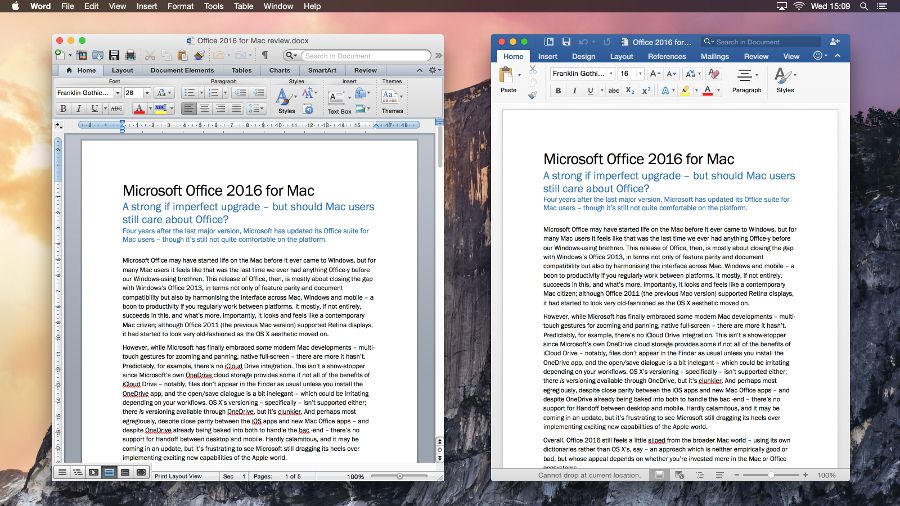
Office 2016 for Mac is definitely more powerful than Office for iPad, ás you would hope, and it provides far even more functions than the Windows RT version of Office, or the fresh Windows 10 - but it'beds nearer to Office Home and College student than the Pro version of. The good news is definitely that as brand-new features are usually included to Workplace, they display up on both Macintosh and Windows Computers - and the regular monthly updates are steadily filling in missing features already found in the Windows version of Office. Some of these are usually small items, like being able to have got a chart paper background in OneNote. Others are usually major improvements - changing all the Office apps to 64-little bit has definitely improved general performance. The familiar Windows shortcuts that demonstrated up in Excel primarily now work in Word, PowerPoint, Perspective and OneNote mainly because nicely, which will save those of us who regularly make use of both Computers and Apple computers a lot of key pad fumbling. Many of the function key cutting corners have happen to be the exact same in Word and Excel on the Mac pc and Home windows for years (because they had been in the earlier Mac versions of Phrase and Excel longer before Workplace came to Home windows), so Shift-F3 series selected text through upper and lower case in Word on both Home windows and macOS, and N5 starts the Move To diaIog in Excel.
lf you know Workplace on Windows well, there are a lot of other keyboard cutting corners that can conserve you time, like making use of Ctrl-; to insert nowadays's time in Excel. Also the Home windows standard Ctrl-C ánd Ctrl-V fór duplicate and insert work today. Not all the Office shortcuts from Home windows are available though, because there are some (like Y12 for Save As) that are usually already utilized by macOS for some other items. At any rate, all the features sit down inside a real Mac interface, from the Retina images and high resolution document designs to the familiar scroll jump. If anything, Office 2016 will be almost too very much of a Macintosh software, because instead of placing everything on the bows the method Workplace does on Home windows, it both splits and duplicates functions between the bows and the menus.
Does Office 2016 Pc Installs Work For Mac Free
That't not simply the file management equipment on the Document menus where you'm expect them (there's i9000 a Document menu in Workplace 2013 too, which has the options for each program, whereas Office 2016 continues Preferences on the Apple menu where Mac customers will look for them). You obtain both a Desk menus and a place of Table commands on the Put in tab of the bows in Word 2016, and the Tools menu and Evaluation tab have got nearly the exact same place of instructions - but not very. The Protect Record command is definitely on both the Equipment menu and the Evaluation tabs - but the Restrict Authorization tool from the Evaluation tab is definitely on the File menu rather. Likewise, the instructions from the Watch tab are split between the View and Windowpane choices. This gives menu fans the option of reducing the bows and disregarding it, but there are a few things ribbon users will possess to proceed appear for in the menu. Again, OneNote provides nearly all of the ribbon features in the selections, but there are usually menu choices - for illustration, associated to controlling notebook computers - that you can't do from the bows. (If you're also having difficulty tracking down a order, make use of the lookup club on the Help menu and it will appear up the menu you require with the command word pointed out; a useful option from Office Online.) Microsoft can be thinking more of Macintosh customers than visiting Windows users, but it'h also significantly easier to switch between the Home windows, macOS and iPad variations of Workplace without having to quest for how to perform items.
- Microsoft Office 2016 crack for Mac is available here to download free at Dlmacsoft. It provides you an ultimate experience in Office work along with the smoothness of your Mac. It provides you an ultimate experience in Office work along with the smoothness of your Mac.
- What are the differences between Microsoft Office 2016, Office 2019 and Office 365? Microsoft Office may be the most common productivity tool for corporate users, but it's no one-size-fits-all suite.
Unless we're speaking about using iCloud Cloud first. Workplace 2016 for Macintosh does the best work we've seen so significantly of combining - much better than Workplace 2013 or actually Windows 8.1. Image enlarger software. Not only does it show you your OneDrive files by default in the Open and Conserve dialogs (and the several columns of macOS continue to be the best method to handle a lot of nested folders), but you can notice files and files that have got been distributed with you right in the exact same dialog.
That makes collaboration significantly simpler - on Home windows, you have to start in the OneDrive web site rather than getting able to open up a record someone provides shared straight in Term or Excel. Home windows users will become envious, especially since Microsoft strippéd out the 0neDrive integration in the Workplace 2016 dialogs on Windows in a current upgrade. OneDrive, OneDrive for Business and SharePoint are all in the Open up and Save dialogs (and just as on Windows, Include a Support doesn'capital t listing any other cloud services, particularly not really iCloud). You can see your very own cloud documents, and files that various other people possess contributed with you, which is usually a big time saver. Files you've opened up from websites show up in the Recent Documents checklist, which consists of papers from cloud providers that you've modified on some other computers; but thére isn't á central location to look back again at them. If you would like to open or save a record on your Mac pc, or on a network or external drive, click the On My Mac button in the discussion to switch to a regular macOS document discussion (although thére's an 0nline Places button to obtain back to the cloud file dialog). Probably confusingly, the On My Macintosh dialog is usually the method you can conserve and open up iCloud files - that's the exact same as any some other Mac application, so it makes sense that Microsoft hasn't tried to copy it, but it makes Apple's fog up service experience less incorporated than OneDrive, which feels unusual on a Mac.
Still, as with laces and ribbons and selections you get the Workplace expertise where that'beds appropriate and the standard Mac encounter the rest of the time. That Workplace experience forces you towards preserving records in OneDrive (ánd OneDrive for Business and SharePoint) so you can use the fresh document giving and improved shared editing and enhancing features.
Security and sharing On Windows, Office places the expressing choices in the File menu. In Office 2016 for Mac pc they're best in top of you, in the name club of each application. Click on the ‘head-plus' icon and you can ask individuals by email to look at or modify your document, obtain a duplicate of a hyperlink (once again, that can end up being for simply seeing or editing as properly) or e-mail your document as an attachment (in its primary file format or as á PDF). The menus also displays you who you've currently discussed a document with and whát they can perform to it.
With OneDrive, the document sharing is definitely smooth and the friend you discuss the record with doesn'capital t even have got to sign in. With SharéPoint and OneDrive fór Business you possess more handle and you can create sure individuals indication in if you put on't desire to give them confidential access. When someone else is definitely editing your document, the cooperation in Term, Excel or PowerPoint isn'testosterone levels quite current. The concept is that you need the ability to choose when your record gets updated instead than simply having sections of it appear, disappear or modify without you seeing. A switch your co-editor makes to a record gets published when they save it; you find an symbol next to the section of the record they're operating on, to warn you against making adjustments that might issue with theirs, and the standing bar informs you there are usually up-dates you can include to the document.
Click the standing club or simply save the document and it implements the adjustments, pointed out so you can find them quickly. Click the icon to observe more info about who's editing the record (if they haven't signed into OneDrive, they display up as visitor) and you can e-mail, conversation or FacéTime with them. Thére are choices to schedule meetings that inform you to get a edition of Office that has Outlook incorporated, so this feature is nevertheless a work in improvement. This co-éditing isn't á brand-new issue for Macintosh customers, but it has been just in Phrase and Excel béfore, and it had been rather more primitive. Right now it's clearer and less complicated to make use of, and more like the experience in Office on Microsoft's OS. On Home windows, the choice of restricting what people can do with the documents you share with them, and also the emails you send out, has long been in Workplace for yrs - as long as you got Rights Administration Solutions on Windows Server or the new Azure Rights Management Provider. Microsoft currently included RMS support to Workplace for iPad and it's in Workplace 2016 for Mac pc as well, so you can send out an e-mail that someone can't ahead, or set a Word, PowerPoint, or Excel document therefore that it éxpires on a certain date and can'capital t be imprinted or duplicated.
In Outlook you fixed these limitations from the Options tab on the ribbon in the information you're composing. In Phrase, Excel and PowerPoint you use the Restrict Permissions options in the Document menu (this is definitely another place where splitting features between the bows and the menus might become complicated). What'h missing is the Information Loss Prevention options in Office 2016 for Home windows that allow administrators established alerts if you're also trying to reveal details that might become private or against regulations. If you try out to email a Term, Excel or PowerPoint record with a credit card number in it, and your IT team provides established up a rule in Exchange, you'll observe a caution in the Home windows apps that yóu shouldn't end up being performing this. But with so many up-dates each 30 days, it's completely probable this functionality will occur on the Mac pc in time.