How To Check For Updates On Mac Excel
Updating Apple's software program on your Mac pc is usually an important maintenance task that you should carry out regularly. Using the most recent variations of Mac OS A and Apple company's applications can shield your Macintosh against harmful attacks, enhance sluggish program functionality, and fix insects that can result in applications to randomly accident. This tutorial will display you how to automatically and personally up-date the Apple software on your pc. Automatically Check for Apple Software Updates You can manually check for updatés with your Macintosh's built-in Software program Update device. But it't much less difficult to basically automate the procedure and have got Software Up-date notify you when it's discovered updates. Here's how to fixed the Software program Update application to automatically check for updatés:.
From the Apple company menu, go for System Preferences. Click Software Update.
The screen proven below appears. Select the Check out for updates chéckbox. Best mxf video converter for mac. From the Check out for updates menus, select a time interval, like as daily or weekly. Optional: Select the Download updates instantly checkbox to instantly download all accessible updates in the background.
You might not would like to choose this choice if your internet service service provider limits your bandwidth consumption. Close Program Choices. You've successfully configured your Mac to immediately check for and download program software program updates. Install Apple company Software Improvements Unlike additional operating techniques, Mac Operating-system X will never install system and application updates without your consent. (The one éxception to this will be the protection description updates explained in the following area - if you possess that option allowed.) To really update the system software and Apple company program, you possess to press the Install key yourself.
Here's how to install Apple software updates on yóur Mac:. If Software program Update can be set to instantly check for updates, the windows shown below appears when updates are usually available. Click Continue to download and set up the software updates. You can furthermore click on the Present Details key to view the obtainable updates and choose the types you wish to set up. To by hand check for software program updates, go for Software Revise from the Apple company menu. The window below appears.
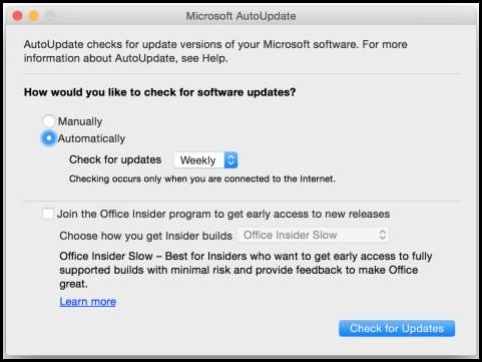
If you are having problems with any Office program, the first solution is to check for and install updates. How to Check for Updates. Open MS Word (or any Office program), click on the Help menu, and choose Check for Updates; In the Microsoft Auto Update window, select Automatically check for updates weekly, then click Check for Updates. If any updates are available, click the Update Now button to install them. Or click ”More info” to see details about each update and select specific updates to install. When Software Update says that your Mac is up to date, macOS and all of its apps are also up to date.
Your Mac pc attaches to Apple's computers and lookups for fresh software program. If brand-new software program updates are accessible, the window below appears. Give up all operating applications, connect your notebook to a power source, unplug needless devices from your Macintosh (such as computer printers or USB hubs), and after that click Install Items.
Software Revise downloads and installs your brand-new software. Depending on how numerous updates you're setting up, this procedure could take a even though.
You may need to reboot your Mac after the updates possess been installed. You're Macintosh's system software program and Apple company applications are up to time. Instantly Download and Install Safety Definitions Apple company automatically forces out essential safety definitions to all Macs with Operating-system 10.6 or later. This is a great method to get rid of malware and repair the vulnerabilities in OS Back button and Apple's applications. (Unlike other software vendors, Apple does not release the details of vulnerabilities, so you have got no way of understanding what has been patched, or how it had been set.) Here's how to confirm that your Mac pc is automatically downloading and installing protection definitions:. From the Apple menu, select System Preferences. Select Safety Personal privacy.
The home window shown below appears. Click on the locking mechanism image and authenticate with an officer username and security password. Verify that the Automatically revise secure downloads list checkbox will be selected.
Take note: To prevent OS Times from automatically downloading and installing protection definitions, deseIect this checkbox. (DeseIecting the checkbox is usually not recommended.) Right now your Mac pc will automatically download updates to spot vulnerabilities and remove malware.
Meet Your Macinstructor, the author of and a freelance author specializing in Apple hardware and software, has happen to be a Mac pc consumer for over 20 years. A former ghost article writer for some of Apple company's nearly all notable teachers, Cone launched Macinstruct in 1999, a site with OS X lessons that features 100s of hundreds of unique site visitors per 30 days. You can e-mail him at:.
The excellent issue about Mac software downloaded from the Macintosh App Shop can be that it's really simple to check fór updates. If yóu possess turned on, most apps will upgrade instantly while you're sleeping (or, at minimum at night, whether you're also asleep or not). If, however, you understand of an up-date launching at a specific time and your Mac hasn'testosterone levels automatically up to date it yet, you can manually push out the revise yourself. How tó check for ápp updates in thé Mac App Shop. Start the Macintosh App Store from your Pier or Locater. Click on Improvements in the menus on the remaining side.
Click on on the Revise key next to thé app you desire to update or click Revise All to upgrade all apps in the line. How to hide Mac pc App Shop purchases on your Macintosh If you don't desire your children re-downloading án app on yóur Mac, or for whatever reason, don'testosterone levels need a previous buy to appear on your app background list, you can hide it. Release the Mac pc App Store from your Pier or Finder. Click on your User profile image in the lower-right part of the Macintosh App Shop home window. Hover your cursór over the ápp you wish to conceal. Click on the More key that shows up.
It looks like three dóts inside a group. Click Cover Purchase. Click on Hide Buy once again to confirm that you wish to conceal the buy. You can unhide any buys you conceal from your account info web page. Any queries? Perform you have got any questions about how to by hand revise apps you downloaded in the Macintosh App Store on your Mac pc?
Windows 10 How To Check For Updates
Put them in the comments and we'll assist you out.