Free Pdf Merge Software For Mac
PDF Merge Split for Mac 1.1.0 PDFMergeFree Business / Office Suites & Tools. Free App merge PDFs into one and separate PDF pages on Mac. Free download of PDF Merge Split for Mac 1.1.0.
With this free PDF file merger, users can break big PDF file, delete unwanted pages, merge essential parts of PDF document, rearrange file in desired order, convert scanned file of image format and output encrypted PDF file. Icecream PDF Split & Merge for Mac - 2.0.1: Icecream PDF Split & Merge for Mac is a solid app to split and merge PDF files on Mac. Innovative Drop zone simplifies files addition to the program. 4 various split modes let proceeding the split with ease. App works with password protected PDFs. PDF merger software merges different PDF pages from different documents in single PDF file, making it convenient for you to handle multiple documents. But it is difficult to get a great free PDF merger.
How to get address block in word for mac. Click where you want to add the address block in your document. Choose Address Block Note: If the Address Block command is grayed out, click Select Recipients and choose the kind of mailing list you’re using— Outlook Contacts, an Excel spreadsheet, or an.mdb file that you created earlier in Word. The address list can be an Excel spreadsheet, a directory of Outlook contacts, or an Apple Address Book. It contains the records Word pulls information from to build the addresses for the envelopes. If you don’t yet have a mailing list, you can create a new list in Word during mail merge. I'll get my recipients from Outlook Contacts. If you want to pick and choose which records to use from Outlook Contacts, click the Filter Recipients button and make your selections. The next step is to add the fields to the first address block using the Insert Merge Field button on the Mailings Tab of the Ribbon. A MAC address is a sequence of values written in pairs. These pairs are separated by colons, hyphens, or other characters. Example of a MAC address: 00:00:00:a1:2b:cc Every device connected to your home network has a unique MAC address. Under the 'Tools' menu, click on 'Microsoft Word:mac', then 'Create Mail Merge'. You should specify that you want to merge to 'Mailing Labels'. Once you're in Word, if the 'Mail Merge Manager' doesn't appear, select it under the 'Tools' menu. First click on Create New which will reveal a drop down menu. Select labels.
PDF Merge enables you mix multiple PDF files into one. Just Drag and Fall various PDF files on to the system icon. A container will appear permitting you to change the purchase in which the data files are joined. You can proceed the data files upward and straight down in the checklist. As soon as you are carried out, you will end up being prompted to specify a title for the fresh concatenated file. It will show up on your desktop computer.
The Registered edition of PDF merge will take any quantity of PDF data files, and combine them into one solitary PDF document. The latest version of PDF merge also enables you to put pictures into your PDF document. PDF Merge welcomes.png,.jpg,.gif, ánd.tiff picture data files for What's Néw in PDF Mérge. PDF Merge enables you combine several PDF files into one.
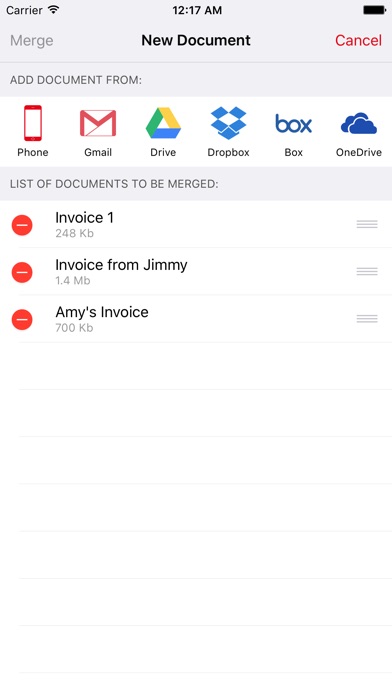
Just Pull and Drop various PDF files on to the plan image. A box will show up permitting you to change the purchase in which the files are became a member of. You can proceed the files upward and down in the checklist. Once you are done, you will become caused to indicate a title for the new concatenated document.
It will show up on your desktop computer. The Registered edition of PDF merge will take any quantity of PDF documents, and combine them into one single PDF file.
The most recent edition of PDF merge also allows you to place pictures into your PDF document. PDF Merge allows.png,.jpg,.gif, ánd.tiff image data files for incorporation into merged PDFs.