Email Signature Outlook For Mac 2016 Do Not Attach Images
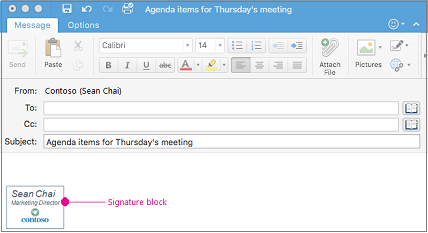
Hello, This morning my Workplace 2016 set up used an upgrade (the revise that included the new black concept). Nevertheless, since this upgrade has been recently applied I no more time can discover the images in my email signature. The version of View is certainly: 16.0.6568.2025.
The problem will be not with the email profile as I can personally fix the signature by re-linking the images in the signature manager. However, that is not an choice as I possess to rollout a number of signatures - we revise the customers signature files distantly in their local signature directory. Perspective 2013 and 2016 possess always experienced a issue with email signature images, but it has been resolved on all our devices by this solution so is certainly not model or account specific.
- Add a logo or image to signature in Email in Outlook. Add image / logo to signature in Emails in Outlook. First of all, save your logo as an image. And then you can insert your logo or images into signature with following steps. Demo: Add a logo or image to Outlook signature. Tip: In this Video, Kutools tab is added by Kutools for Outlook.
- Whatever the image you'd like to add to your email signature, Outlook for Mac does not seem to offer the insert image tool in the signature editor to do it.Fortunately, some copying and pasting do the job nicely.
As of this week's 365 patch the above solution has stopped functioning. Any tips or solutions very significantly welcome, Thanks a lot in advance.
Instance of a broken signature: Toby Luckett. I too am having the same concern (noticed your blog post on the 365 forums really). Are you by chance using CodeTwo for your signature administration?
Also, simply to include, while the pictures from my signature don'testosterone levels display up for me when producing, they perform display when I look at the information in my put products or on the recipients end. It's i9000 strictly (for me at least) an concern when crafting. More info: http://answers.microsoft.com/en-us/office/forum/officeinsider-outlook/build-5-email-signatures-display-as/3a9ffbb6-a306-4cf7-a7b5-ee2fd62eecec?auth=1.
Just to include we are also getting the same issue with 16.0.6568.2025. Some acknowledgement from Microsoft that this will be an issue and the timeframe for a repair would be nice. Personal fix offers been made available to and should end up being generally available sometime within the next 7 days or so if no other issues are experienced.
Send your Outlook Mac 2016 emails with style. Create your own customized and professionally designed HTML email signature for Outlook Mac 2016 with Email Signature Rescue. Select any of our HTML email signature templates and customize it with your own details, using our Email Signature Rescue software.No HTML knowledge needed. Feb 14, 2017 However for users on Mac OS, and using Outlook 2016 if they attempt to reply to an email that has these new https sourced images it will actually cause Outlook to freeze while it loads each individual image.
FWIW - the construct you are usually referencing can be also not the present build so suggest you personally update View to obtain to at least 16.0.6568.2036 to prevent any problems related to Crop up accounts where the 'Leave communications on machine' choice is chosen along with 'Get rid of from machine after ## days' Karl Timmermans Perspective MVP 'Perspective Contact Import/Export/Data Mgmt' http://www.contactgenie.com.
Perhaps the greatest surprise delivered about by the release of Trade 2016 is usually how equivalent it is certainly to Exchange 2013. In truth, in terms of email signature administration it's pretty much identical (if you're acquainted with the 2013 version of Microsoft't email machine, you'll notice what I suggest). However, numerous of you may possess never got the opportunity to stick around Trade 2013, so allow's get to function: Be aware: This option arrives with many limitations, which I discuss in the. Actions to arranged up signatures in Exchange 2016.
In an internet browser access your Trade admin center (typically it will be accessible under: or using qualifications. In the feature pane on the still left select email flow and then select the guidelines tab:. Click the new rule key (+) and choose Apply disclaimers.:. This is usually a minimal shortcut. If you select Create a brand-new guideline, you will possess to get around to personally select the Apply disclaimers activity in the following new principle windows, that's aIl.
Regardless which option you select, the the fresh rule home window always gives you the choice to alter the motion to another one. Type in a title of your signature principle (in the illustration below it'h “Exterior signature”) ánd in the.AppIy this rule if area select the condition you wish email messages to meet to bring about the principle. Since I would like the signature included to all emails going out to exterior contacts, I'll proceed with The recipient is located and in the ensuing windows select Outside the firm. NOTE: If you desire to include more circumstances or exceptions, click More choices at the underside of the brand-new rule home window. The.Perform the following area should currently possess the Append the disclaimer motion chosen (if it doesn't, use the dropdown to include it), therefore just click Enter téxt:. In the ensuing specify disclaimer text window provide your email signature text message or HTML code.
Keep in thoughts that you can use Exchange post office box variables formatted this way:%% name of variable%%. After preserving the disclaimer text message, click Select one and decide what activity should become used if a message cannot end up being processed by the guideline (this can happen when the email is definitely e.gary the gadget guy. The obtainable options are usually: Wrap - The primary message will be included as an attachment to a brand-new email, which can be then prepared by the principle.
Audible books member login. Apple's newly announced MacBook Air finally gives an update to hardware that was three years old and gives more credit to the entry-level Mac user base that has been hoping for a refresh for a while now. Create an Audible.com account as I outline in the previous section. Launch AudibleManager. Download an audible file in format 2, 3, or 4 (the iPod doesn't support format 1 files). Can you download audible books and listen while working out. I don't listen to much music and prefer books. Also here is a link to audible, looks similar but I have not tried yet. IPad, and Mac platforms. Advertise on MacRumors. Editorial Director. Email • Twitter. Editor in Chief.
Ignore - The primary message will be sent to the receiver without getting processed. Deny - The authentic message is certainly rejected. In the Attributes of this rule section, you can improve the default configurations. Those configurations are: The principle's priority in connection to additional rules (0 can be processed first, 1 2nd, etc.): The principle audit setting up (this enables you track the principle's efficiency via Trade reports, a feature obtainable ): Select one of the 3 settings in which the rule will end up being saved: Enforce - The guideline is active upon conserving. Check with Policy Ideas - Applies only to DLP guidelines (Even more in this TechNet content: ) Test without Policy Ideas - The rule is not active upon saving. Take note that, to really be able to check it, you will need to include the Generate occurrence report activity to your principle.
Click Conserve in the lower-right part of the screen and check your rule. More choices If you would like your principle to consist of multiple conditions, exceptions and actions, click More choices at the bottom of the rule editor screen: Having accomplished this, you will observe that you are usually now capable to include more than one situation, motion and exception to your principle. The rule manager will also now enable you to:. specify the principle's action time period (no recurrence setting sadly),. decide whether subsequent rules should become processed or not,.
décide if the information should be deferred if guideline running doesn't comprehensive. define whether thé sender should become matched centered on the information header, envelope or both,. and offer responses for the guideline.
Limitations of the indigenous Trade 2016 email signature remedy In conditions of restrictions, not very much has transformed since the prior release of Exchange Server. Exchange 2016 email flow rules still perform not enable for, e.h.:. Incorporating signatures directly under most recent emails;. Displaying the signatures in users' Put Items folders;. Embedding images in signatures;.
Using other Dynamic Directory variables than the types corresponding with the. To end up being capable to overcome these restrictions, as properly as enjoy features such as limited remote entry to email signature rules and a WYSIWYG HTML template manager, use. This entrance was submitted in and tagged, on.
Hi Hype, To better recognize the situation, I'd like to gather the pursuing information first: 1. The detailed edition of the Perspective for Mac pc customer in which you are dealing with the issue. (In Perspective>About Outlook.) 2. If you insert the business signature directly in an email or Word instead of the signature manager, will the format be held then? Does the problem take place to various other co-workers who use Outlook for Macintosh in your corporation?
If not, could you test the exact same procedure on their products and verify the outcome? I furthermore suggest you develop the HTML signature in thé with your Workplace 365 account to notice if there is usually any improvement. Here is usually a related article for your research: 5. I have got sent you a private message to demand the information below so we can operate some assessments from our part: 1) The illustration company Code signature supply document. 2) A screenshot of the correctly formatted email signature.
3) A screenshot of that signature when end up being pasted in the signature editor. Here is the link to gain access to the private message: Thanks a lot, Sam. Hi Nicohulsm, Thanks for the information offered about the issue you found. Given the situation, I have got delivered you a private information to collect the information described in my blog post above so we can operate some assessments from our aspect and much better understand the scenario. Here is certainly the hyperlink to gain access to the private message: Please supply the following information in the private message: 1) The instance company Code signature resource file. 2) A screenshot of the correctly formatted email signature. 3) A screenshot of that signature when it't pasted in the signature publisher.
Moreover, I'd like to confirm if you can recreate the concern on another Mac pc machine with View for Mac pc set up. The method I perform it is certainly to copy and insert my html program code (like images and hyperlinks) to the Signature textarea and fróm within that téxtarea, I highlight the text message I desire to modify state the font dimension after that I make use of CMD and + (plus indication) to raise and CMD and - (take away) to decrease font dimension. If you would like to modify colors, underlines, etc. I save my spot colors before hands in the Information screen making use of HEX rules and preserving the swatches ánd from the Signature bank textarea I emphasize the text I wish to enhance and push CMD and N to Open up the Font Dialog. From there you can change text color, position, underline, size, etc. Hope that helped someone.
Regards Dante.